Wednesday, April 9, 2014

What am I DOING?!?

Blog. Blahhhh-g.

Or at least that's what I thought when I first started blogging, if I may be honest. I'd never been a blogger and only followed a very small handful of blogs.  Typically these ranged a narrow span of my nearly-obsessive running passion and my love of dogs. Don't get me wrong- I love to read! But I categorized blogs as the editorials of electronic media, and as someone who historically skipped over the editorials in newspapers, when I transitioned my media intake to on-line versions, I conveniently skipped over blogs.

Then I was charged with blogging professionally a few years ago. "Neat-o" was my less-than-enthusiastic inner-monologue.  That was followed up with, "I better do some research here!"  And thus my blogging journey began...
image from: https://www.flickr.com/photos/nightthree/300232474/


Finding #1: Blogs can be research-based.
Well, this kind of blew my mind! So much for my blog-bashing based on my unfounded opinion that blogs were simply a stream of consciousness for anyone with Internet access.  Some of my favorite postings include commentary on well-researched concepts and pedagogy.  Whether or not I necessarily agree with the commentary is beside the point- these blogs make me think!

Finding #2: There is a blog for everyone.
Admittedly, I had a poor attitude at the get-go.  It was short-lived, I assure you.  As part of my research, I wanted to read different blogs to find a style that was comfortable, get ideas, and seek inspiration.  For a week or so I searched and read, searched and read, searched and read.  And then I realized at one point I was kidding myself.  I wasn't researching anymore.  I was reading because I wanted to.

Finding #3: Blogging starts conversations.
Once upon a time, I erroneously thought that blogs were a one-way purge of thoughts. Nope. Sometimes blogs stand alone, but often, through the comment sections, conversations are started that provide rich discussions of issues addressed in the blog. Points, counterpoints, new research, respectful debates, and even blogs inspired by the original blog all happen through these comments.

Finding #4: Blogs connect people.
The power of posting a public blog are immeasurable. People from all over the world (especially with the translation tools available at the click of a button) can find, read and, interact with these blogs. Discovering new viewpoints, networking outside of one's immediate community, and becoming a part of a global association all happen through blogs.

Finding #5: Blogs don't have to run on forever.
In my naive mind, I thought that blogs were kind of ramble-ish, lengthy, scroll-down-nine-times, and somewhat never-ending. I found that some of the best blogs (in my opinion) were concise, yet thought-provoking or lengthy out of necessity. The beauty of blogs is that there is no pre-determined word count.

Finding #6: Blogs can be inspired from anything.
Albeit I still admit running into writers' block occasionally, the truth is there is so much to ponder, opine, and share, a more common problem is focusing on one topic. Blogs can be commissioned, out-of-the-blue, themed, etc. My own range from life lessons learned from my kids to power-outages to my love of educational technology tools (in particular, My Big Campus).  Having a venue to share, connect, and reach other educators has been a unique experience for me- and one tempered by my own postings about whatever topics I broach in a new post.  Speaking of, I am already feeling inspired for a sequel to this post...something along the lines of "Students Speak! No Ifs or Ands...Just Blogs!"

Monday, February 17, 2014

Snow way!

For the tenth evening in three weeks, my children joined the greater Richmond area youth staring at the screen with crossed fingers, inside-out jammies, and silent pleas. The alphabetical listings of closings seemed to take forever to get to the P's, but sure enough, there it was! "Powhatan County Public Schools closed Friday."  Oh, how they rejoiced! Fist-bumps, shrieks, high-fives, a victory dance that would put Merton Hanks to shame! Instead of assessments and homework, there would be another day of sledding, cocoa, movies, puzzles, and forts!


Meanwhile, my inner-teacher was seeped in empathy for the educators who had carefully planned, prepared materials, and tried desperately to follow the scope and sequence. I received messages from teachers about on-line practices and games to keep my kids' experience with class material fresh. Although I insisted the children do these activities, it was not quite the same as receiving new lessons, getting teacher feedback, and being able to pace themselves through relevant content.  For these reasons, I strongly advocate a growing practice of "virtual learning days" versus "snow days."

You can check out this enlightening article of a real-life experience here: Homework in bed or you can read on further to see how My Big Campus can help recover time lost to Mother Nature and keep students engaged regardless of lengthy weather-delays.   Here's how to get started:

* Make students and parents aware!  In your syllabus, make note of the fact that your class will still move forward despite hurricanes, blizzards, tornados (think postman's creed here)! Send the message from day one that your class is ready for whatever surprises this year has in store! Give concrete directions of where students are to navigate on days the school building is closed.  It is rare that inclement weather truly hit us by surprise, so be prepared to post and remind again as ominous conditions arise.

* Bundle a self-paced unit! Keep the momentum going in your class!  For each unit, pull resources, assessments, discussions, and activities together and let students keep working.  You can use bundle locks to reveal content by date, user, or mastery of material. Let it be known that your students will continue on this bundle for the unit, thus making the time spent on this relevant (instead of being viewed as busy-work).

* Have a non-wired back-up plan!  Not every student may have Internet connectivity at home. Make note of those students ahead of time.  Provide them with hard-copies of materials ahead of time (if possible) and even follow-up with a phone call or two to check-in. With the simplicity of branching and editing bundles, you can modify the unit for students that need to work both on and off-line. Bundle-stashing on the MBC ap also allows for work off-line that is automatically submitted once students are wired!

* Make virtual office-hours! Post an hour or two that your class can meet on chat or video-chat if they are available.  Despite students' enthusiasm for days off, they also do miss each other (and you!) and the social aspect of class.  It is a novelty to students and you just may be surprised at the level of participation you get!

* Debrief when you are face-to-face again!  What worked? What was helpful? What was confusing? What would they like to see more of? What did they feel was worthwhile? What was their favorite part? What was difficult and why? Ask them! Oh, they WILL tell you!  Then use this feedback to create your next virtual learning day unit.

Despite students' enthusiasm for unexpected days off, there is not one student that wants to be in school until the middle of July making up days. Although it is a district/state-wide decision how to make-up days (if they are made up at all), it can be a classroom teacher's decision whether or not to keep the momentum and learning going even on days off.  Keeping pace with teachers' original plans leaves more time for enrichment and improvement!


Not only will you be keeping your students on-track academically, but believe me when I attest to the amount of parent support you will receive! After the hands and cheeks are too pink to stay outside any longer and the hot-cocoa is gone, children inevitably revert to those two words that drive parents nationwide batty. "I'm bored."  Parents will embrace the meaningful activities you have planned for their children.  Trust me! I know first-hand!


Monday, January 27, 2014

You're Wired Just Perfectly

I have two kids that mean the world to me.  I dote on them, love them to a point of distraction, smother them in hugs, and regale them with words of wisdom about all aspects of life (at least that's the aim). As my career revolves heavily around appropriate use of the Internet, this topic comes up rather frequently as I promote liberal, responsible use of technology in my home.  Of course, I have them safely filtered and under parental controls- and they are fabulous children- but occasionally they slip on the rules.  I caught one child creatively playing with WordArt. The WordArt itself was enchanting to look at on first glance- vibrant colors, twisty contour- and it was all with the word "underpants."

I sighed, the child looked at me abashedly, and I went through some of my standard lines. "Is that something you would want your Grandmother to see?  Is that something that would make your teacher proud? How do you feel about yourself now that I saw it?"  We discussed, deleted the "underpants," and resolved to make better decisions.

The thing is, I was ok with this- all of it.  My kids are curious, boundary-testing, typical students- just like your students.  We adults can tell, model, preach, and even DEMAND rule-following, but the way they grow and learn is through trial and error.  I would much prefer my own children err in a safe, monitored environment than out in the wide world of Internet-ness.

This is exactly why I adore My Big Campus.  MBC provides an environment in which students can navigate through a social-learning platform under an umbrella of safety (check out more here).  With safety features such as 24/7 monitoring, profanity interception, user -report abuse buttons, flesh-tone scanning, and suspicious activity reporting, My Big Campus is indescribably secure.

Nevertheless, it is understandable when teachers have questions about monitoring a site that is available to students 24/7.  Fear not! Whether you unplug at 3:30 when the kids leave or have your smart phone as another appendage, My Big Campus is for you!  Here is how this works if you are:

Unplugged   It is perfectly acceptable to unplug! It is absolutely ok to tell your students that after you leave school, play taxi-service to your own children, make dinner, and settle into your home, you will probably not be on-line checking assignments or messages.  No worries! With the features My Big Campus already has in place, Discussions are already monitored, Bob Campus is around for any Q/A, and those assignments will be waiting in the cloud when you are ready!

Semi-plugged    It is also super if you know you will have some dedicated time to check back in on your classes at some point after class is out.  Let them know that any questions they have before 8 PM will be answered before you go to bed- anything else will be handled in class or in the morning.  You could also dedicate a chat-time to hang out on-line and be available for them in Group Chat. No need to use up the whole evening on the computer, but if you are more comfortable jumping on-line a few times at night, we have the tools for you!

Fully-plugged  If you are wired like me, chances are you are rarely without some sort of device to be on-line. I let students know that before I went to bed, most questions would be answered almost immediately if they messaged me (then I changed my notifications to send me a text of their messages). This worked for me as I am rarely without my phone. Any messages after bedtime, I simply addressed in class.  I was both refreshed and rejuvenated to find my students participating and inquiring at all hours outside of our regular meeting times. We really had created an active extension of our classroom!

image retrieved from: http://farm4.staticflickr.com/3061/3077035953_2aa573c111_o.jpg


 Regardless of how you are wired, you are wired just perfectly for My Big Campus!

Tuesday, January 14, 2014

It's All About Who You Know

The other day, as I was cruising around one of the winding country curves near my house, a man came running up the street at me flailing his arms and screaming for me to slow down. I slammed on the brakes and tried to size up the situation.  I mean, any man willing to play a game of chicken with a car had to be a little crazy.  Before he had a chance to even say a word, I saw the issue, which was also headed straight toward me.  It seems this man's pig had decided to take a leisurely stroll right down the middle of this two-lane road. To fully understand the situation, let me divulge a few details:

1- There are no shoulders on country roads. Most often there are ditches or trees that reach out onto the road.

2- I am referring to a pig that is a country pig. I mean, 700 pounds of bacon slowly ambling up the road.

3- There's no way either one of us (me or the pig) are getting by each other.

To add to the chaos, there was another man trying to coax this creature into submission. He was begging, holding up food, and even using his full body-weight to try to push the swine toward the edge of the road and presumably home. It was like watching a cartoon-or watching a ground hog try to derail an NFL tackle. Not happening. The pig could not have cared less- and wasn't breaking his lethargic stride.

I just sat there in the car for a bit. This was not the first time (nor would it be the last) I was running late due to animal-intervention. I have been held hostage on a dirt road by a flock of turkeys that was running in circles. My cars have been accosted by deer too many times to count. I have sat patiently while a line of alpaca decided to s-l-o-w-l-y cross the road in front of me. I even followed behind a cow for miles once because it simply would not get out of my lane (I was in a no-passing zone...it just felt wrong).  Such is life in rural Virginia- there are some huge upsides to country living, but there are some unpredictable deterrents.

Teaching in rural Virginia also presented some unique opportunities, but also obstacles.  One of my biggest frustrations was feeling isolated professionally. Often I was the only teacher in the district that taught the classes I taught. I had no one to share ideas with and generate plans. I didn't know where to go for collaboration and often felt stuck with the ideas in my head.  I could go to conferences and pick up ideas, but then would stagnate. I was truly stuck to my own devices once I headed home, which presented a very real problem when I wanted to try to flip my classroom or teach the on-line Senior Project course. I realized, too, that my students were victims of operating in my cutoff classroom.  I knew there were other classes and educators out there that must feel the same as me, but I struggled to find them. Enter My Big Campus...

Connecting with other educators was effortless with all of the site features on My Big Campus that foster collaboration, building relationships, and linking people together.

My first stop was EduTalk:
EduTalk is a news feed (that can also be integrated with Twitter) specifically for educators. Reading the current trends and finding educators that share my interests and passions was simple through keyword searches and hashtags.  I can go on the general feed to make new connections and see the latest trends there. I even created my own personal feed to streamline the people I interact with most.

Speaking of personalizing my learning, I also started Following people:
By following others, their posts and insights showed up on my Activity Feed.  I could keep current with their on-line happenings and use them to generate ideas of my own.  I could also Message them to collaborate or create a think-tank. I have met incredible educators with innovative ideas and strategies through these connections.

Looking for more ways to connect? Try the Library:
                
In the Library, once you find quality resources posted by other educators, you can see who added the items as well as their other contributions.  I made dozens of connections exchanging resources with other teachers who shared my preps and interests.  My Big Campus made it easy to put me in touch with classroom leaders I had so much in common with- but would never have found otherwise!  Finally, I was truly collaborating and exchanging ideas!

Next, I discovered Topics:


Topics are global spaces for any non-student users to view/post resources, start/join discussions, meet other educators with the same interests, and expand their professional networks. Search around the Topic repository and you will surely find some relevant to you and your interests! Whether you are seeking subject-matter expertise, want to read up on 1:1 initiatives, crave some iPad collaboration, or even just need cool bulletin board ideas, we have Topics for you!

Speaking of...check out this Topic made just for educators seeking connections:

 Campus 2 Campus Topic

Go ahead and click and join! This new Topic is already populated with educators itching to reach out and connect with you!  Whether you want to video chat with a classroom in another region, pair students up with e-pals, or get creative in lesson-design by collaborating with other campuses, this is a one-stop shop made just for MBC users!

So, having alleviated many of my rural-teaching woes, I am still stuck with a few chagrins of country life. The pig eventually took a detour off the main road (maybe due to its owner's pleas, but I think mostly it just got bored with the terrain) and I eventually got home.  Sometimes I struggle with what to make for dinner, but it was an easy choice that night- and those pork chops were delicious!


Sunday, January 5, 2014

Let's Discuss That

I'm a talker. I always have been.  I have never been accused of being shy, withdrawn, or introverted. I am going to date myself here, but as a child, my parents would good-naturedly start humming the Jabberjaw theme song to gently remind me to zip-it for a few minutes. It worked. For a few minutes. Then I was at it again yapping to a parent, sibling, friend, dog, stuffed animal, wall...I'm not picky.

image from: http://thesweetestplum.com.au/2013/02/03/63-the-denial-of-self/

There are some up-sides to being chatty.  I meet people easily, can carry a conversation with just about anyone, and am generally viewed as friendly and approachable. 

There are some huge disadvantages that I recognize as well.  I can wait-to-talk instead of listening, dominate a conversation, or generally not allow the precious silence some people prefer.  When I ask people if I can reach out for a "quick call," sometimes (even thousands of miles away) I swear I hear their eyes roll. 

As a teacher, I adored the extroverts in class.  I often found the loquacious students amusing, fun, and interesting.  Often, but not always.  During class discussions, despite all my efforts with timers, signals, pre-determined orders, and a last-ditch failed talking-stick-fiasco, the unreserved conversationalists would battle it out for air-time and the less verbose students would shrink into their chairs.  It was a real problem- until I found the perfect solution!


Using Discussions on My Big Campus leveled the playing field for my students.  It didn't matter how reserved or wide-open my young scholars were.  Each had an equal voice when we moved the discussions on-line. No one had to cut short what she/he wanted to say due to time allowances, taking turns, or being interrupted.  Sometimes the most astute postings were from students that simply had a fear of speaking aloud.  Furthermore, students could read and re-read each others' contributions.  They could formulate more complex ideas rather than just having to respond right in the moment. Students could respond to each other asynchronously and revisit threads they wanted to contribute more to.

In verbal discussions, there was a momentum that drove the conversation down a very linear path. With on-line conversations, the threads and expansions created a rich web in which ideas were thoroughly developed, debated, and extended.  We could all go back and read everyone's contributions, then thoughtfully respond.

I appreciated that on-line discussions could be continued indefinitely.  Sometimes an idea from a current theme sparked a prior-knowledge chord in students.  Reading their new comments on previous Discussions let me know they were making connections, retrieving antecedents to the present lesson, and truly developing instead of just having static thoughts.

The main draw to Discussions is that students like it! In fact, I would occasionally ask if they would prefer a face-to-face or on-line discussion about a topic and (without fail) the consensus was to have the discussion on-line. These digital natives enjoy the format as well as the affirmation through comments and "hearts" that their opinions matter and even evoke further commentary from their peers.

Whether your students are chatterboxes (like me!) or a bit more reticent, My Big Campus Discussions offer a positive venue for your classes. Give it a whirl- here's how to get started: http://j.mp/103BmiP .


The internet could be a very positive step towards education, organization and participation in a meaningful society. ~Noam Chomsky

Well said, sir. Now let's discuss that!

Friday, November 22, 2013

Why Would I Use That?

My formal training on My Big Campus went something like this:

Tech Director, "Hey Steph! Here's your log on information for something we want you to try out. It's called 'My Big Campus.'  Go ahead and click around because you won't break anything. After a few months, we'd like you to train the staff so we can roll this out schoolwide. So- off you go! Any questions?"
Me, "Do what?!? Ummm. Ok."
Image retrieved from: http://carrierubin.files.wordpress.com/2012/09/confused-woman.jpg

Now do understand that my Tech Director was a friend of mine and would never throw anything at me he did not think I could handle. Understand, too, that our technology department had fallen victim to budget cuts.  For several years we had to fill in the gaps by using some of the tech-savvy teachers as ITRT roles.  I didn't mind being tasked with this, but I also was super-skeptical.  I had gone through more than one hot new tech trend that either did not deliver what I needed or was way too complicated for practical use.  At worst, I even tried some tools that really were just using technology for the sake of using technology with zero apparent gain for my students nor me.  I think of the latter as the useless bath-water thermometer I received upon the birth of my first child. I could either appease the buzzing sounds of the thermometer by getting the temperature in the correct range- or I could just stick my hand under the faucet.  I was fairly certain My Big Campus would fall into one of these categories, but wanted to give it an honest try.

Wow, was I wrong.  I could give you countless reasons such as ease-of-use, connecting with other educators, and sharing resources, but most teachers want to know how using My Big Campus can improve their day-to-day classroom.  I started with the practical ABC's of why MBC is so great, but it ended up the ABCDEF's (and even then I had to restrain myself from venturing further into the alphabet for the sake of brevity).
Image retrieved from: http://cdn2.content.compendiumblog.com/uploads.gif
Accountability
When using features such as Schoolwork, Resources, Announcements, and Calendar, there is 100% accountability both on the student and teacher side.  Every student receives the information, thus eliminating all of the potential "I didn't hear you" or "you never told me" or "I was absent that day" or even "I didn't know what the quiz was on." Start by adding an event to the calendar and attach a study guide. Viola! In thirty seconds or less, you just held every student accountable!  Furthermore, start operating through Schoolwork and you will be immediately impressed that there are no more misplaced assignments and no more lost copies (bonus- no time at the copy machine for you!).

Bob Campus
If you've ever experienced one of those "stuck" moments while using technology, you know that sometimes even finding where to find the help you need can be stressful.  Problem solved. Bob Campus is available 24/7 for you and your students with timely, informative, and helpful answers to anything the arises during your My Big Campus experience. You are not alone-ever. Bob's got your back!

Competency
How do you know that your students are learning?  I know that for me, giving an assessment meant that I needed to collect the assignment, grade, then disaggregate the data in order to plan for the next activities. With over 150 students, I tried my best to be efficient, but sometimes it took longer than expected. I had to make assumptions that were fairly accurate, but were not data-driven until the process was actually complete.  I was astounded at how my pacing and efficiency improved dramatically with MBC reporting. Not only could I run Live Reports to get a view of how my students were performing right at that very moment, but I could also look at their performance based on standards over a longer period of time through Academic Reporting. Need to show evidence of student growth? Run a report, print screen, DONE!

Digital citizenship
I suppose in my teaching contract, my job title read "Spanish teacher." In reality, I looked at my job more as to teach students to be better at life through a Spanish-based curriculum. This meant focusing on some soft-skills that aren't really quantifiable at the end of the year, but I would argue are more important than whether or not a student can conjugate "hacer" in the imperfect subjunctive in twenty years. These included discipline in study habits, recognizing one's own strengths, and working collaboratively. Whether or not students went on to higher learning or entered the workforce, I also felt that promoting digital citizenship was paramount to the success of each child in the future. The problem was, I had a hard time tying it into my curriculum before MBC. One of the first things I noticed was how naturally this happened from the first time my students logged on. We decided to set up accounts and add profile pictures- BAM! Perfect opportunity to discuss appropriate versus inappropriate images on-line (and encourage them to convey this to their personal social-media usage).  Each Wall post, Discussion, Chat, and interaction was an opportunity for a teachable moment.

Engagement
Teaching 101 will tell you that when students are engaged, everything else falls into line. Discipline issues decrease, academics improve, and overall attitudes about learning receive a boost.  Through the MBC Library, teachers can unlock interactive websites, captivating videos, and fascinating presentations. Differentiating for student needs is simply a few clicks away as well. Furthermore, students can create work they take pride in through Bundles, MBC Docs, and Blogs.  My students loved Discussions in particular as they all had an equal voice and could express themselves sometimes even months after the initial posting if something crossed their minds. Feeling a part of an on-line community of learners is appealing- and if you can get your students itching to participate, the days really do fly by seamlessly.

Fun
It may sound trite, but using MBC is fun. It was rejuvenating for me as a teacher to be able to step away from my board and become a facilitator to student learning rather than a content deliverer. It was fun for my students to explore Spanish in ways much more appealing than a lecture-worksheet-quiz format.  It was fun for parents to rejoice the successes of their students. I had the type of classroom that administration loved to visit because the kids were on-task and smiling (and not just for show!).  My pupils were engaged because they genuinely liked what we were doing.  I attribute this to the tools MBC provided to let me teach with the resources I knew would best fit my students.


So- I didn't really adhere to my promise of brevity, and I may have to follow up with a G-Z list of why I choose to use My Big Campus.  As an initial skeptic, my question was, "Why would I use THAT?" I am at a point now that I frequently ask myself, "How did I get along WITHOUT it?!?"

Tuesday, November 12, 2013

HELP!!!

"Where is my file?"
"What is this icon on my app?"
"Did that submission go through?"
"Where do I find my blog?"
"How do I disable my chat tab?"
"Where can I learn how to flip my classroom?"

image from: http://www.flickr.com/photos/dominic/3678910353/

Sound familiar?  Never fear! MBC help is here!  For teachers and students both, My Big Campus has a myriad of solutions for you to get the answers you need, when you need them!

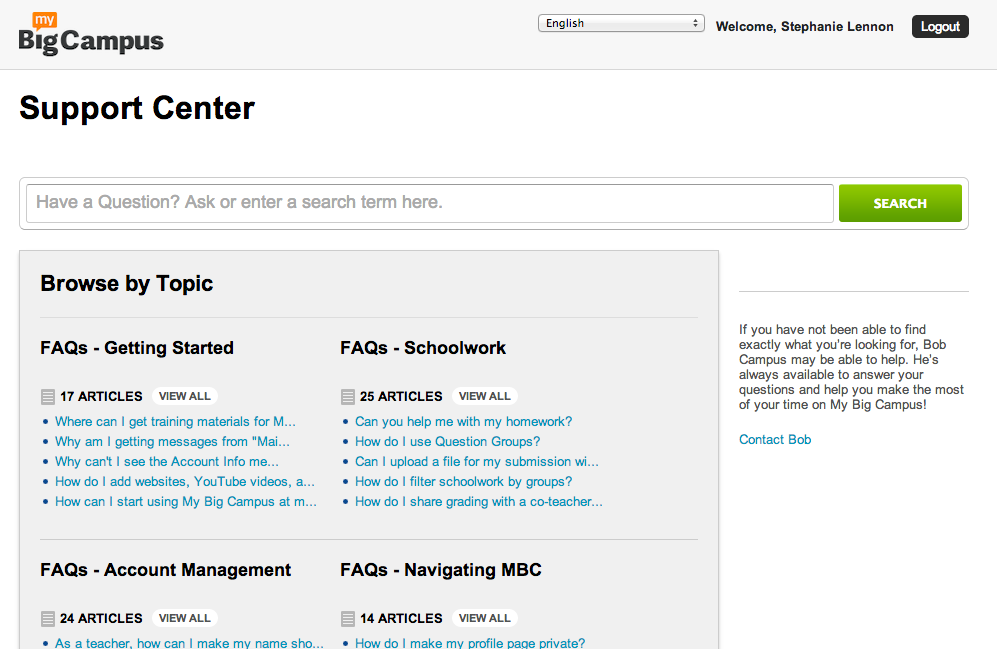
My Big Campus Support Center

The Support Center at MBC has an answer for you!  Hover over your profile picture in the top right corner and select "Help" from the menu to access immediate answers to the most frequently asked questions. Type in your question or key word search in the prompt to see the results of your search. Questions are loaded with screen shots, explanations, step-by-step instructions, and student and teacher views. All of the answers to the most common questions are available right at your fingertips!

Bob Campus

Need a little more personal attention? Can't find what you are looking for in the Support Center? No problem! Bob's got your back!  Bob Campus is available for 24/7 live help for students and teachers in need.  From your Activity Feed, Bob can be accessed simply by clicking on his name. Type in your questions on Bob's Wall and then relax.  Within moments, you will see a notification that Bob has an answer for you! This hard-working robot will work with you through any inquiries, any time of the day or night, any time zone.  No questions are too big or too small for this droid! Rest assured that teachers, students, administration, technology specialists, and any other MBC users can access the help they need any time!

support@mybigcampus.com

Have an inquiry you don't want to post on Bob's Wall? That's ok as well. Email support@mybigcampus.com with your questions for our experts.  Use as many details, screen-shots, usernames, and examples as possible to help us troubleshoot in the most efficient and detailed way. Our panel of problem-solvers will get back to you in a timely manner to help you with any queries you have!

Live webinars

If you are ready to get a walk-through from one of our Mobile Learning Experts in a live webinar, this is the place for you! Are you interested in an overview of what My Big Campus is all about?  Sign up here: http://www.lightspeedsystems.com/mbc-teacher-webinar/  If you are interested in more specialized webinars including Bundles, E-portfolios, Using MBC on the iPad, Groups, NROC, NBC Learn, Emergency Contacts, and Schoolwork, sign up here: http://mbcurl.me/RQS. Come ready to learn or even armed with your questions for these open-mic, interactive webinars with the people who know all the tips and tricks- and are prepared to share them with you!

On-demand webinars

Prefer to learn on your own time? Great! We have a series of webinars for teachers and IT that you can watch at your leisure.  Check out recorded versions of the Live Webinars, plus topics including Hosted School Websites, MBC Docs, and an IT Overview.  You can pause, rewind, re-watch, and even show your faculty these recorded versions of the most popular features of My Big Campus! Join us here: http://www.lightspeedsystems.com/demo/webinars/ for these on-demand webinars.

image from: http://commons.wikimedia.org/wiki/File:2000px-ok_x_nuvola_green.png

My Big Campus prides itself not only on being user-friendly, but also making sure that users feel a-ok with their MBC experience.  We welcome all questions from all users- all the time! With the levels of support offered at My Big Campus, we are sure you will find the answers you need when you need them! Reach out- we are happy to help!